- Retro Swap
- Posts
- Shinobi, Sharpen Your Steel: Why This Retro Throwback is the Ninja Gaiden Successor We’ve Been Craving
Shinobi, Sharpen Your Steel: Why This Retro Throwback is the Ninja Gaiden Successor We’ve Been Craving
PLUS: This New Handheld Literally Flips the Script: The Anbernic RG Rotate is Officially Wild
In partnership with

Fun Fact: Did you know Final Fantasy’s name came from Square facing bankruptcy. The creator, Hironobu Sakaguchi, intended for the game to be his final contribution to the industry before retiring.
In today’s email:
Your Dog Deserves Better Than Mystery Kibble

Most kibble is cooked at extreme temperatures that strip out the nutrients your dog actually needs. Your dog deserves better than that.
Spot & Tango's UnKibble is the only human-grade dog food that delivers all the benefits of fresh food without taking up fridge space. Made with USDA-grade meats, plus fresh fruits and vegetables, then gently dried at low temps to lock in up to 99% of nutrients. As vets say: "This is the food dogs were born to eat."
It's pantry-friendly, delivered to your door, and comes with a personalized scoop sized to your dog's exact needs. No guesswork, no prep, no refrigeration.
350,000+ dog parents have already made the switch — and 87% saw health improvements in their pup after switching.
A little gift your dog deserves. Try it risk-free with a 14-day money-back guarantee and get 60% off with code DESERVES60
Shinobi, Sharpen Your Steel: Why This Retro Throwback is the Ninja Gaiden Successor We’ve Been Craving
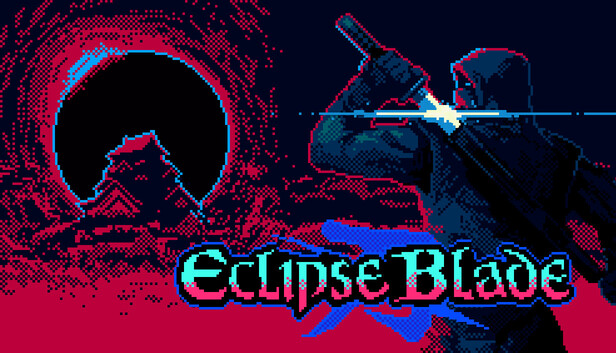
If you grew up with a controller in your hand and a healthy fear of birds knocking you into pits, you know that the "Ninja Action" genre peaked in the 90s. But every so often, a project comes along that captures that lightning in a bottle without just being a cheap imitation. Enter Eclipse Blade, the pixel-perfect love letter to the 8-bit and 16-bit eras that’s currently setting the retro community ablaze. Developed by the indie wizards at TiNTz, it doesn’t just mimic the classics; it sharpens them into something dangerously addictive.
A Masterclass in "Old School" Cool
What makes Eclipse Blade stand out in an ocean of "neo-retro" indies is its uncompromising commitment to the feel of the 90s. We’re talking hand-crafted pixel art that looks like a lost Capcom masterpiece and a difficulty curve that respects your intelligence while testing your reflexes. You play as the chosen ninja tasked with infiltrating the "Eclipse Gate," a portal spewing ancient evil into the world. It’s a simple setup that paves the way for what really matters: blistering speed and precision platforming.
Blades, Blood, and Branching Paths
Unlike the rigid linearity of the NES days, Eclipse Blade introduces a level of customization that feels modern. As you slice through the darkness, you unlock a variety of ninja skills and upgrades, allowing you to tailor your playstyle. Want to focus on long-range shuriken or high-risk, high-reward katana parries? The choice is yours.
Regional Rundown: Currently, the game is gaining massive steam on Steam (pun intended), targeting a worldwide digital release. While there are no pesky regional locks for the PC version, collectors are already whispering about potential limited physical runs for the Japanese market—stay tuned on that front.
The Speedrun Factor: The devs have baked a dedicated Speedrun Mode and a "Hardcore" setting right into the base game. It’s clear they know their audience: the kind of players who count frames and live for the perfect run.
Gameplay Breakdown: Mastering the Shadows
The core loop revolves around fluid movement. Your ninja feels light, but every swing of the blade has weight. The "Eclipse" mechanic itself isn't just window dressing; it affects visibility and enemy patterns, forcing you to adapt on the fly. It’s a dance of death that feels as good as it looks.
Quick Notes: The Eclipse Intel
Developer: TiNTz
The Vibe: High-octane ninja action inspired by Shinobi and Ninja Gaiden.
Visuals: Modernized 8/16-bit hand-drawn pixel art.
Launch Details: Coming soon to Steam; physical console ports rumored for late 2026.
Standout Feature: Deep upgrade tree that changes how you approach boss encounters.
Difficulty: High. Bring your A-game (and maybe a spare controller).
Think you’ve got the reflexes to close the Eclipse Gate, or are you just bird-bait? Hit the comments and let us know which retro ninja classic is your all-time GOAT!
This New Handheld Literally Flips the Script: The Anbernic RG Rotate is Officially Wild
Just when you thought the retro handheld market was getting a little too "samey," Anbernic went and threw a curveball—or rather, a 90-degree swivel. The RG Rotate has officially been revealed, and it is a glorious, fidget-friendly love letter to the era of weird 2000s tech. If you remember the Motorola Flipout or the Nokia 7705, you already know why this is the coolest thing hitting your pocket this year.
A New Twist on the 1:1 Square
The star of the show is a proprietary, ultra-thin alloy hinge that lets the screen swivel 90 degrees to reveal a full set of GBA-style controls underneath. While it looks like a boutique, high-end MP3 player when closed, a flick of the thumb transforms it into a dedicated retro powerhouse. The 1:1 aspect ratio screen is a dream for Game Boy Purists, and because it runs on Android, you’re getting all the flexibility of modern frontend launchers with that delicious, old-school tactile click.
In a first for Anbernic, they are offering the RG Rotate in two distinct flavors. You can go for the ultra-premium Aurora Silver with a full Aluminum Alloy shell, or the stealthy Polar Black in ABS Plastic for a lighter (and likely cheaper) everyday carry.
But the customization doesn't stop at the shell. Anbernic is introducing swappable shoulder buttons, allowing you to switch between "High" and "Low" L2/R2 triggers. Whether you want a flush, pocketable profile or a more ergonomic grip for those intense SNES sessions, the choice is yours.
The "Fidget" Factor and the Trade-offs
Let’s be real: this thing is a fidget toy for grown-ups. The durability-tested hinge is designed for constant flipping, making it the ultimate "EDC" (Everyday Carry) companion. However, there is one catch that might sting the audiophiles: there is no 3.5mm headphone jack. To use this as the MP3 player throwback Anbernic is pitching, you’ll need to rely on the top-mounted USB-C port or Bluetooth.
The Cheat Sheet: RG Rotate at a Glance
The Gimmick: A 90-degree rotating 1:1 screen with a high-durability alloy hinge.
OS: Android (expect smooth emulation up to N64).
Battery Life: 2,000 mAh with 10W fast charging (5V/2A).
Build Options: Aluminum Alloy (Silver) or ABS Plastic (Black).
Pro Move: Swappable L2/R2 trigger heights included in the box.
The Bummer: No 3.5mm jack. Dongle life, here we come.
Final Word: The RG Rotate is easily the most experimental handheld we've seen in 2026. It’s small, it’s weird, and it’s undeniably stylish. Whether you're in it for the Game Boy perfection or just want something to flip while waiting for the bus, this is one to watch.
Are you Team Aluminum or Team Plastic? Let us know in the comments before the pre-orders go live!
Your Crusty Retro Handheld Screen Has a Secret "Self-Heal" Button
Forget the bleach and the teardowns—that ugly yellow tint on your childhood DS or PSP might just need a long, bright nap.
If you’ve recently dug your Nintendo DS Lite or PSP-1000 out of a dusty drawer only to find the screens looking like they’ve been soaking in a vat of lukewarm tea, you aren’t alone. Screen yellowing—or "ambering"—is the ultimate vibe-killer for retro enthusiasts. But before you go hunting for a replacement LCD on eBay or scouring forums for soldering guides, there’s a surprisingly low-tech "fix" circulating through the restoration community. By simply pushing the pixels to their limit with a pure white stress test, you might actually be able to "burn" the yellow away.
The Science of the "UV Ghost"
Most of us assume yellowing is permanent damage caused by heat or aging adhesive (and sometimes, it is). However, in many aging handhelds, the discoloration is caused by uneven liquid crystal fatigue or moisture trapped in the polarizing layers.
The trick is deceptively simple:
Plug your console into a wall charger (this is vital).
Set the brightness to max.
Open a browser page or an image of a pure white hex code #FFFFFF.
Leave it running for 12 to 24 hours.
By forcing every sub-pixel to stay fully "open" at maximum voltage, you’re essentially evening out the chemical state of the display. It’s the digital equivalent of a deep tissue massage for your screen.
Does it actually work?
Results are a bit like a boss fight—they vary based on your RNG. Users in the Japanese retro-modding scene (where the PSP-3000 and DSi XL remain legendary) have reported significant "bleaching" effects after a full day of white-screen soaking. While it won't fix a physically cracked digitizer or a "vinegar syndrome" smelling screen, it can noticeably clear up that murky, aged look that plagues the Japanese "Ceramic White" PSP models and the launch-edition DS units.
Regional Quirks and Hardware Hits
Interestingly, this fix is most popular among collectors importing Japanese (NTSC-J) hardware. Because Japan saw exclusive, vibrant colorways like the Mint White 3DS or the Champagne Gold PSP, keeping those screens crisp is high-priority. Note that some early North American DS Lites used a specific adhesive that is more stubborn, meaning you might need to repeat the "white-out" process over several nights.
Quick Hits: Handheld History
The Culprit: Most common in the DS Lite (US/JP) and PSP-1000/2000 models.
The "Burn-In" Irony: While OLEDs fear static images, these older TFT LCDs often benefit from the "exercise" of a static white screen.
Release Trivia: The DS Lite launched in 2006 and remains the best-selling iteration of the hardware, though its screens are notoriously prone to yellowing compared to the original "Phat" DS.
Expert Tip: If you're on a PSP, use the "Photo" app to view a white JPEG. On DS, use a flashcart or a GBA game with a white menu screen (like Pokémon).
The Final Verdict
Is it a miracle cure? Not quite. Think of it as a restorative facial for your favorite legacy device. It’s free, it’s safe, and it doesn't require you to open up the shell and risk snapping those fragile ribbon cables.
Have you tried the "White Screen" method on your old-school handhelds? Did it save your screen or is it still looking like a slice of American cheese? Let us know in the replies—and keep those batteries charged!
Reply